Cap embroidery is one of the most challenging areas of embroidery digitizing. When done correctly, it can produce some of the most professional-looking results.
Because caps are curved, structured, and limited in space, they require a different approach than flat designs. In this guide, you’ll learn how to digitize a cap step by step, along with the key rules that lead to clean, readable, and high-quality embroidery.
What is Cap Embroidery Digitizing?
Cap embroidery digitizing is the process of creating embroidery designs that stitch correctly on caps and hats. To achieve clean results, the design must be planned for center-out stitching, proper spacing, and smooth stitch flow across the cap’s surface.
Why Cap Digitizing is Different From Flat Embroidery
Caps create physical challenges that directly affect how stitches behave during embroidery. Understanding these differences helps prevent distortion, gaps, and uneven stitching.

Curved Surface of a Cap
Unlike flat fabric, a cap has a curved surface that wraps around the front panels. This curve affects how stitches lie and can cause distortion if not handled properly.
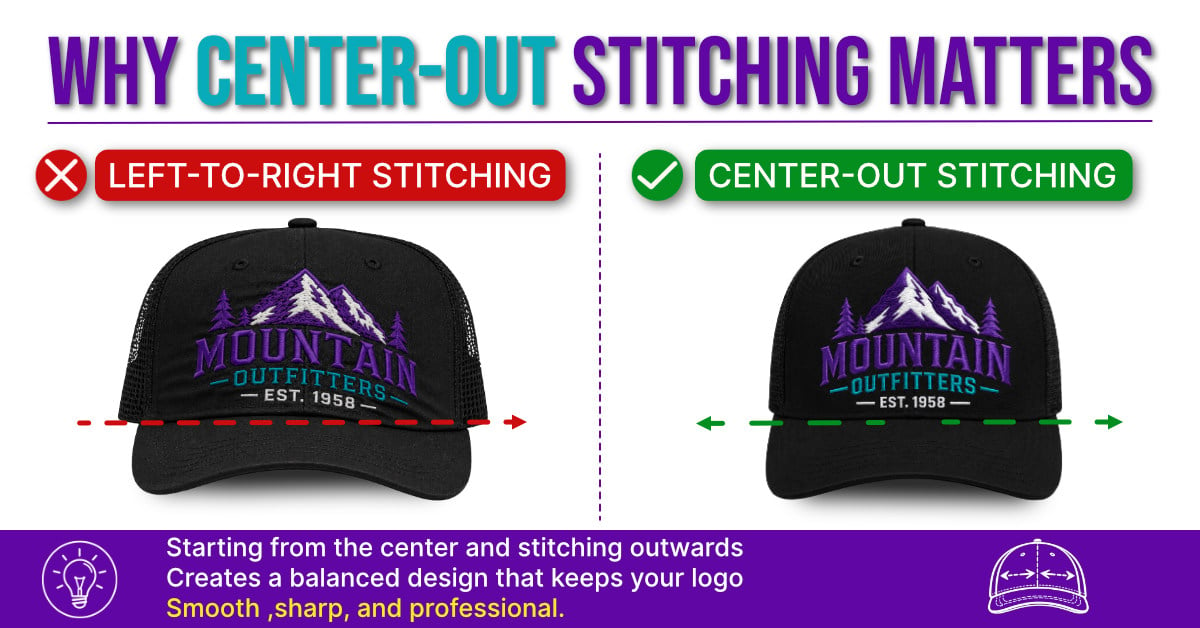
Why Center-Out Stitching is Critical
Professional cap designs almost always stitch from the center outward. This keeps the design balanced and reduces fabric shifting during stitching.
If a design is stitched left to right or in a random order, lettering and spacing can become distorted as the cap moves in the frame.
Limited Space and Design Constraints
Caps offer a much smaller embroidery space than flat garments, which limits how much detail you can include in a design.
Small text, thin lines, and intricate details often do not stitch cleanly on caps. Bold shapes and clean lettering usually produce the best results.
Key Rules for Clean Cap Embroidery Digitizing
To get clean, professional results on caps, follow a few fundamental digitizing rules. These principles help control distortion, improve stitch flow, and ensure your design stitches cleanly.
- Always digitize from the center out
- This keeps the design balanced and reduces fabric movement.
- Work from the bottom up
- Starting near the brim helps stabilize the design as it is stitched upwards.
- Keep designs wide and simple
- Bold shapes and clean lettering work best on caps.
- Control stitch direction and inclination.
- Proper stitch angles help maintain smooth curves and clean edges.
- Reduce trims and jump stitches
- Efficient pathing improves stitch quality and creates cleaner embroidery.
- Adjust for push and pull compensation
- Slightly adjusting shapes helps prevent gaps and distortion during stitching.
Prefer watching over reading?
Watch this step-by-step cap digitizing tutorial to see the entire process in action, including stitch sequencing, center-out stitching, lettering techniques, and final stitch-out results.
How to Digitize for Cap Embroidery Step by Step
Digitizing a cap design required planning, precision, and an understanding of how stitches behave on a curved surface. Follow these steps to create clean, professional embroidery designs for caps.
-
Set Up Your Artwork and Center Guidelines
Start by loading your artwork into your software and preparing your workspace.
- Add a vertical center line to mark the middle of the cap
- Reduce the artwork’s opacity so you can clearly see your stitches
- Align your design to the center guideline
This center line helps keep the design balanced as you digitize outwards.
-
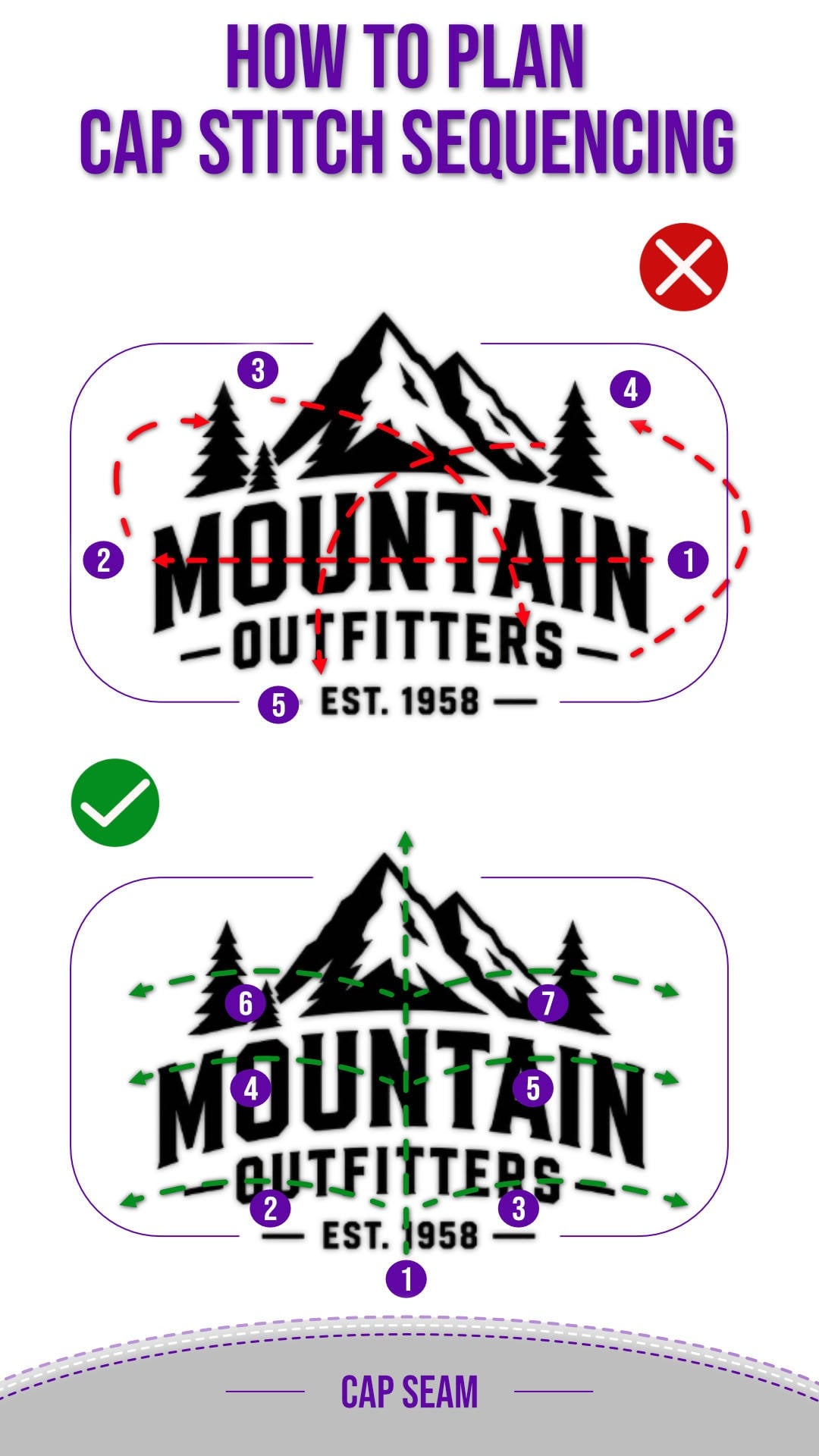
Plan Your Stitch Sequence Before Digitizing
Before placing any stitches, take a moment to plan your approach.
- Decide the order in which your design will stitch
- Follow a bottom-up, center-out workflow
- Identify areas where trims should occur
Proper embroidery pathing improves stitch flow and reduces jump stitches.


-
Start Digitizing the Base Element First
Begin with the elements closest to where the brim meets the crown of the cap.
- Start near the lowest part of the design
- Build outward from the center
- Focus on creating strong, clean foundational shapes
This creates a stable base and helps reduce distortion as the design builds.
-
Use Satin Stitches for Clean Lettering
Satin stitches are ideal for most cap lettering because they create smooth, bold edges.
- Control stitch width and thickness carefully
- Use stitch direction (inclination) to follow the shape of each letter
- Keep edges clean and consistent
When digitizing small lettering, prioritize clean stitching over perfectly matching the original artwork.
-
Adjust Underlay for Small Cap Details
Underlays play a major role in how your design holds its shape.
- Use a center run underlay for small details
- Avoid heavy underlay on small lettering
- Keep the structure light to prevent bulk
For small elements, a single pass of underlay is often enough.
-
Use Run Stitches to Control Travel Paths
Run stitches help guide the machine between elements without creating visible jumps.
- Use them to connect nearby objects cleanly
- Avoid long visible travel paths
- Minimize unnecessary trims
Efficient pathing improves both stitch quality and production speed.
-
Refine Stitch Direction and Overlaps
Once your main shapes are in place, refine how stitches flow across the design.
- Smooth out curves using proper stitch angles
- Slightly exaggerate shapes to compensate for fabric movement
- Maintain a clean baseline, especially in lettering
These adjustments help prevent gaps and uneven edges in the final stitch-out.
-
Run a Redraw to Check Stitch Flow
Before exporting your design, preview how it will stitch.
- Use the redraw or simulation feature
- Watch the stitch sequence carefully
- Look for unnecessary trims, jumps, or direction issues
This step helps you catch mistakes before stitching the cap.
-
Test the Design and Make Final Adjustments
The final step is always testing.
- Review stitch count and overall efficiency
- Run a test stitch-out on a cap
- Make small adjustments as needed
Even strong designs often need small refinements after testing.

Common Cap Embroidery Digitizing Mistakes to Avoid
Stitching Left to Right Instead of Center Out
Caps should always be stitched from the center outward. Stitching from one side to the other can cause uneven spacing and distortion.
Using Too Much Detail on Small Designs
Small lettering and intricate details often do not stitch cleanly on caps. Simplifying artwork usually produces better results.
Poor Stitch Direction Angles
Incorrect stitch angles can make lettering look uneven or distorted. Proper stitch direction helps maintain clean edges and smooth curves.
Too Many Trims and Jump Stitches
Excessive trims and jump stitches can make a design look messy and increase production time. Use efficient travel paths whenever possible.
What Embroidery Designs Work Best for Cap Embroidery?
Not every design works well on a cap. The best cap embroidery designs are usually bold, simple, and easy to read.
Simple Lettering and Bold Shapes
Clean lettering and solid shapes typically stitch better than scripts of highly detailed artwork.


Cap Logos and Hat Emblems
Logos and emblems-style artwork work well because they fit naturally within the limited embroidery area.
When digitizing logos for caps, simplify small details and widen narrow shapes to improve stitch quality.
Final Tips for Professional Digitizing Results
Professional-looking cap embroidery comes from careful planning, clean digitizing, and proper testing.
Keep these final tips in mind before running your next design:
- Always test stitch your design before final production
- Use a proper stabilizer for the cap material
- Keep lettering clean and readable
- Prioritize clean stitching over excessive detail
- Review the stitch flow before exporting your file
Small adjustments during digitizing can make a major difference in the final embroidery quality.
Embroidery Digitizing Software
Cap digitizing may seem complicated at first, but like any embroidery skill, it becomes much easier once you understand the fundamentals of stitch flow, sequencing, and design setup.
If you’re new to embroidery digitizing, our Free Digitizing 101 Course is a great place to start. It walks you through the core principles of embroidery digitizing step by step, helping you build the confidence to create your own custom embroidery designs.
Once you understand the basics, having the right software makes the process faster, easier, and far more enjoyable. Our user-friendly embroidery digitizing software was designed specifically for embroiderers, with a clean interface, built-in education, and powerful tools that simplify the digitizing process for beginners and experienced users alike.
Whether you want to create custom caps, logos, patches, or lettering, the right foundation and software can help you turn your ideas into professional-quality embroidery.
Frequently Asked Questions for Digitizing on Caps
What is Cap Embroidery Digitizing?
Cap digitizing is the process of creating embroidery files specifically for caps and hats. Because caps are curved and space-constrained, designs must be digitized differently from those for flat embroidery to ensure clean stitching and proper alignment.
How do you digitize a cap without distortion?
To reduce distortion, digitize from the center outward, use the proper stitch direction, minimize unnecessary trimming, and adjust for push-and-pull compensation. Testing on an actual cap is also important for identifying problem areas.
What stitch is best for cap embroidery?
Satin stitches are commonly used for cap lettering and bold shapes because they create smooth edges and clean coverage. Fill stitches may also be used for larger design areas.
What size should a cap design be?
Most front cap designs are typically 2 to 2.5 inches tall, depending on the cap style and embroidery area. Keeping the design simple and readable is more important than maximizing the size.